The application framework for agent systems.
Write each agent as a TypeScript file. Foundry runs them as a service: a persisted agent per customer, durable conversations, a job queue, schedules, webhooks, human approvals, a typed and an OpenAI-compatible API — and an inspector that shows you how every run happened.
Write a file. Run the server. Call your agent.
import { createAdapter } from "glove-core/models/providers";
import { defineAgent } from "glove-foundry";
import { z } from "zod";
import { FileStore } from "../../lib/file-store.js"; // 25 lines, from the tutorial

export default defineAgent({
  description: "Answers questions about orders",
  model: () => createAdapter({
    provider: "openrouter",
    model: "openai/gpt-4.1-mini",
    stream: true,
  }),
  // Each run is its own process: keep the transcript somewhere durable.
  store: ({ conversationId }) => FileStore.open(conversationId),
  // Resolved per run, from the instance's own data.
  systemPrompt: (_agent, ctx) =>
    `You are support for ${ctx.agentInstance.context.company}.`,
  tools: [{
    name: "lookup_order",
    description: "Find an order by id",
    inputSchema: z.object({ orderId: z.string() }),
    async do({ orderId }) {
      return { status: "success", data: { orderId, state: "shipped" } };
    },
  }],
});$ pnpm dev
Glove Foundry
Local: http://127.0.0.1:4141
Agents: 1
Runtime: ready
Types: .foundry/routes.d.ts
# Create an instance of "support" for one customer
$ curl -s localhost:4141/api/agent-instances \
-H 'content-type: application/json' \
-d '{"definitionId":"support","context":{"company":"Acme"}}'
{"id":"agent_…","definitionId":"support",…}Open http://127.0.0.1:4141 to chat with it in WebChat and watch each model pass and tool call in the run trace.
import OpenAI from "openai";

const openai = new OpenAI({
  baseURL: "http://127.0.0.1:4141/v1",
  apiKey: "unused-on-loopback",
});

// model = an instance id, or a route
// with exactly one instance
const reply = await openai.chat.completions.create({
  model: "support",
  messages: [
    { role: "user", content: "Where is order 1042?" },
  ],
});
Or use the generated typed client: foundry.send(agentId, conversationId, text).
Everything between “an agent loop” and “a product people use”.
Glove gives an agent its abilities. Foundry gives it the rest of a backend. Every item below ships in glove-foundry and is on by default or one definition away.
Agents as files
agents/support/agent.ts is the agent “support”. Generated route types make every client call type-checked.
defineAgent · FoundryRoutesInstances & conversations
One definition, many persisted agents — each with its own context, installed apps and any number of conversations.
createAgent · createConversationTyped client & REST API
Create agents, send messages, wait for runs, read transcripts and stream events from your app or another service.
createFoundryClient · /api/*OpenAI-compatible endpoints
Point any OpenAI SDK, chat UI or eval harness at an agent. Conversations stay durable across requests.
/v1/chat/completions · /v1/responsesInspector & WebChat
localhost:4141 shows every definition, instance, run, event and schedule — and lets you chat with any instance.
glove foundry devSchedules, sleep & spawn
Agents wake themselves on a cron or after a delay, suspend and resume the same conversation, or start other agents.
defineSchedule · glove_foundry_scheduleInbound events & playbooks
Webhooks and chat messages arrive as runs. Subscriptions can provision a fresh agent per thread or per event.
defineTransmission · composePlaybookInstallable apps, tools & MCP
Each instance installs only the capabilities it should have, with typed config and per-account credentials you control.
defineApp · defineMcp · install()Approvals
Mark a tool as permission-gated and the run pauses on an expiring approval record until a person approves or denies it.
requiresPermission · resolveApprovalSteering
Redirect an agent mid-task: Foundry interrupts at a safe boundary and restarts with the new instruction in the same conversation.
handle.steer() · /v1/runs/:id/steerWorkspaces, files & code
A persistent virtual filesystem, JavaScript/Python/Lisp REPLs, document and media adapters, shared tasks and an inbox.
defineWorkingEnvironment · defineReplBrowsers & sandboxes
Mount browser sessions and persistent coding containers. Foundry hosts the providers on the Station it already runs.
mountBrowser · mountSandboxOne definition. A different agent for every customer.
A definition says what an agent can assemble. An instance is a persisted record of what one agent has: its context, the apps and MCP servers it installed, its playbooks and schedules. On every run Foundry reloads the instance and resolves each field against the new message — so changing an instance never requires a deploy.
Definitions & instances →import { defineAgentInstance, install } from "glove-foundry";
import support from "./agent.js";
import helpdesk from "./apps/helpdesk.app.js";
import refunds from "./tools/refunds.tool.js";
// Same code, two customers, different capabilities.
// Installed tools and apps mount only on the instance that installed them.
export const acme = defineAgentInstance(support, {
workspaceId: "acme",
context: { company: "Acme" },
installations: [
install(refunds, { limitUsd: 200 }), // typed by the tool's zod config
install(helpdesk, { queue: "enterprise" }),
],
});
export const globex = defineAgentInstance(support, {
workspaceId: "globex",
context: { company: "Globex" },
installations: [], // no refunds, no helpdesk
});What you stop writing.
Only embedding one agent inside an existing app? glove-core and glove-react are enough. Compare the paths →
Stop drawing every route through the work.
Workflow software asks you to predict the branches. Foundry lets you define capable agents, the world they can act in, and the boundaries they must respect. The agent can interpret the request, plan, create artifacts, ask for approval, schedule a follow-up, and adapt while it runs. Deterministic handlers and fixed schedules are still there when you need them.
One managed Station. The providers you choose.
Mount browser workflows and persistent coding sandboxes with glove-execution. Foundry can run their provider adapters alongside agent jobs on the Station it already owns.
Run the illustrated Operator example →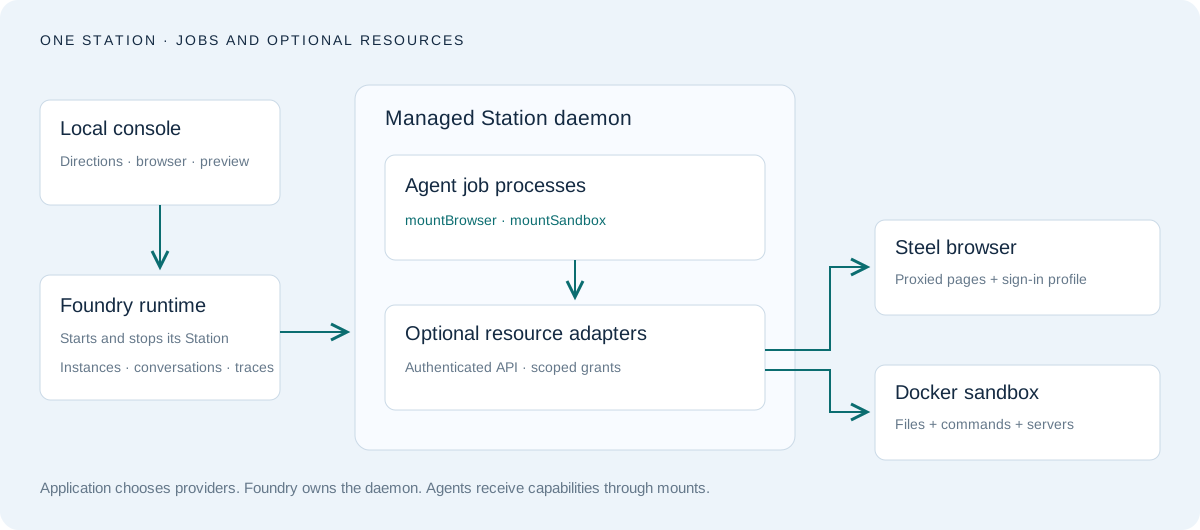
Read a complete system.
Browses sites, writes an app and keeps its server running in a persistent container.
Mesh · voice · image · workspaceBraind StormA voice-led brand workforce of five agents sharing one sandboxed workspace and a live observatory.
Reference appRelease planner & guided intakeThe canonical small project: a typed handler, schedules, and goals, facts and forms on SQLite.