A browser, a workspace,
and your next direction.
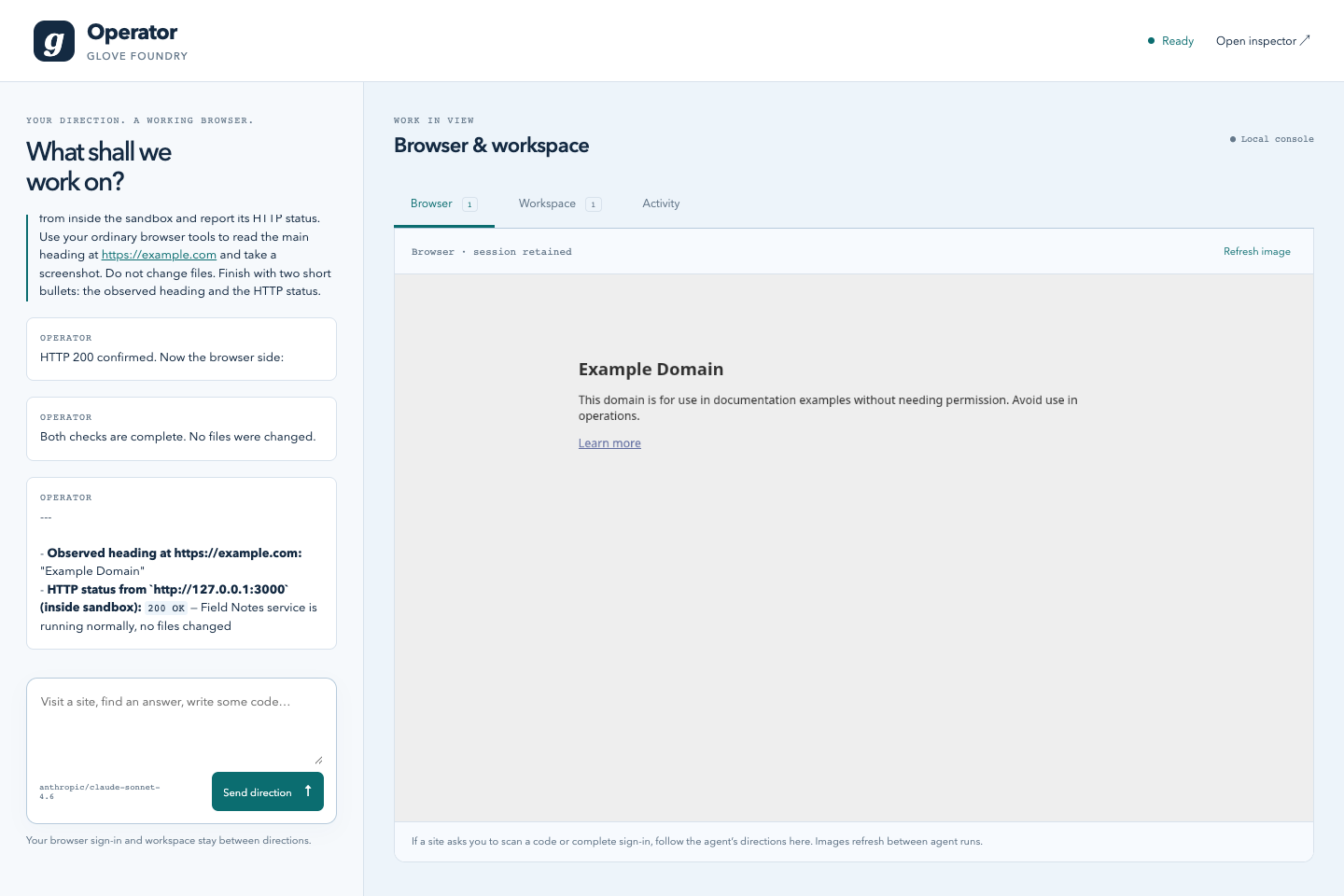
Operator is a runnable Foundry agent that browses websites, uses Telegram Web after you sign in, writes code, and runs a server in a persistent container. Give it a direction and watch the work in one local console.
Open the example source ↗ · Setup and operating guide ↗
Run Operator locally
You need Node 22.13+, pnpm, Docker, and keys for OpenRouter and Steel. The example runs from the Glove repository and reads keys from your environment or private files.
pnpm install
pnpm --filter glove-core --filter glove-js --filter glove-execution --filter glove-foundry build
cd examples/foundry-operator
cp .env.example .env.local
# Set OPENROUTER_API_KEY_FILE and STEEL_API_KEY_FILE.
docker pull node:22-bookworm-slim
pnpm start
Open http://127.0.0.1:4243. The console lets you give directions, see the browser, preview a running app and inspect agent steps. The full Foundry inspector runs on port 4245. This is a private, single-user local example.
Steel sessions explicitly set useProxy: true to use its residential proxy network, including when creating the saved profile. Proxy availability and billing depend on your Steel account. There is no unproxied fallback; individual sites can still require sign-in or restrict access. See Steel's proxy documentation.
Capabilities attach through mounts
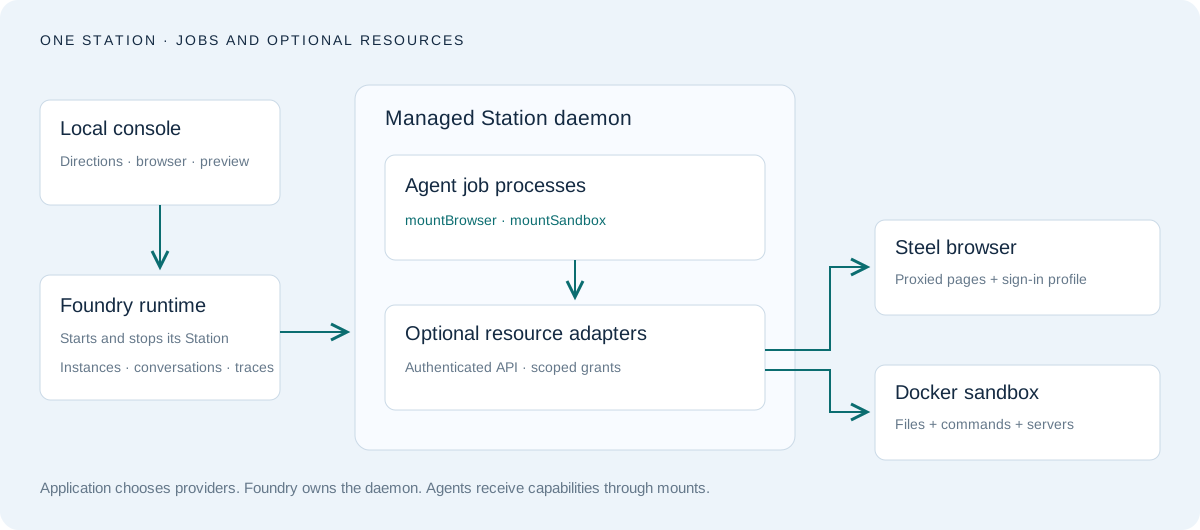
glove-core has no browser or container dependency. Install the optional glove-execution package and call its mount functions on an existing agent. Station adapters live behind the separate glove-execution/station entrypoint. Another provider can implement the same adapter contracts.
import { defineAgent } from "glove-foundry";
import { mountBrowser, mountSandbox } from "glove-execution";

export default defineAgent({
  description: "Browse, research and build",
  model: () => createModel(),
  async configure(agent, context) {
    const browserAdapter = await createBrowserScope(context);
    let closeBrowser = () => browserAdapter.close();
    context.onCleanup(() => closeBrowser());
    const browser = mountBrowser(agent, {
      adapter: browserAdapter,
    });
    closeBrowser = () => browser.close();

    const sandboxAdapter = await createSandboxScope(context);
    let closeSandbox = () => sandboxAdapter.close();
    context.onCleanup(() => closeSandbox());
    const sandbox = mountSandbox(agent, { adapter: sandboxAdapter });
    closeSandbox = () => sandbox.close();
  },
});
The scope factories above are application-owned helpers. Operator's complete implementation constructs Station adapters with explicitly granted resource IDs. Register cleanup immediately after acquiring each resource, so a later setup failure also releases its scope.
Configure the shared daemon once in the application. Foundry starts one Station instance for agent jobs and the optional browser/sandbox adapters; the console does not create another worker.
import { defineApplication } from "glove-foundry";
import { stationDaemon } from "glove-foundry/station";

export default defineApplication({
  name: "Operator",
  daemon: stationDaemon({
    stationId: "operator",
    resources: createResources, // returns { browser, sandbox }
    onReady: connection => savePrivateConnection(connection),
  }),
});
The resource factory and private connection storage are application-owned. Omit the daemon option for jobs only; omit either provider when it is not needed. Foundry owns startup and shutdown. Agents still receive scoped access through their mounts.
One script can finish a browser workflow
The model gets execute_browser and execute_sandbox, each backed by Glove's bounded JavaScript interpreter. Tool calls resolve automatically. A script can inspect a page, branch on what it sees, fill a form, click and verify without a model round trip for every action.
const sessionId = browser.sessions({}).sessionIds[0];
browser.navigate({ sessionId, url: "https://example.com" });
const heading = browser.evaluate({
  sessionId,
  expression: "document.querySelector('h1')?.textContent"
});
browser.screenshot({ sessionId });
heading;
Discover schemas with fns("browser") and describe("browser__interact"). The workflow interpreter has no ambient host filesystem or network. Page evaluation is a separately granted browser capability. Screenshots enter the next model request as native images after tool results, rather than base64 text in the transcript.
Sign in to Telegram yourself
- Tell the agent: “I want to use Telegram Web. Open it and get to the QR sign-in screen; I’ll scan it.”
- The agent uses its general browser tools to find the site, inspect the sign-in UI and show you the screen. There is no Telegram-specific setup or integration.
- Scan the code with Telegram on your phone, then give your next direction.
The browser retains a Steel profile so you can reuse the sign-in across sessions. Profile changes persist when Steel releases the session; the live tab and script bindings have separate lifetimes. Telegram can still require another sign-in. Opening Telegram is not permission to send messages: the example instructs the agent to act on messages only when directed.
Telegram sign-in has not been verified end to end: the earlier QR screen remained loading. The verified browser workflow uses a public page; a proxy does not guarantee a site will accept the session.
Keep QR codes, signed-in screens and chat transcripts out of public screenshots. The images on this page show public demo data only.
Write code and keep a server running
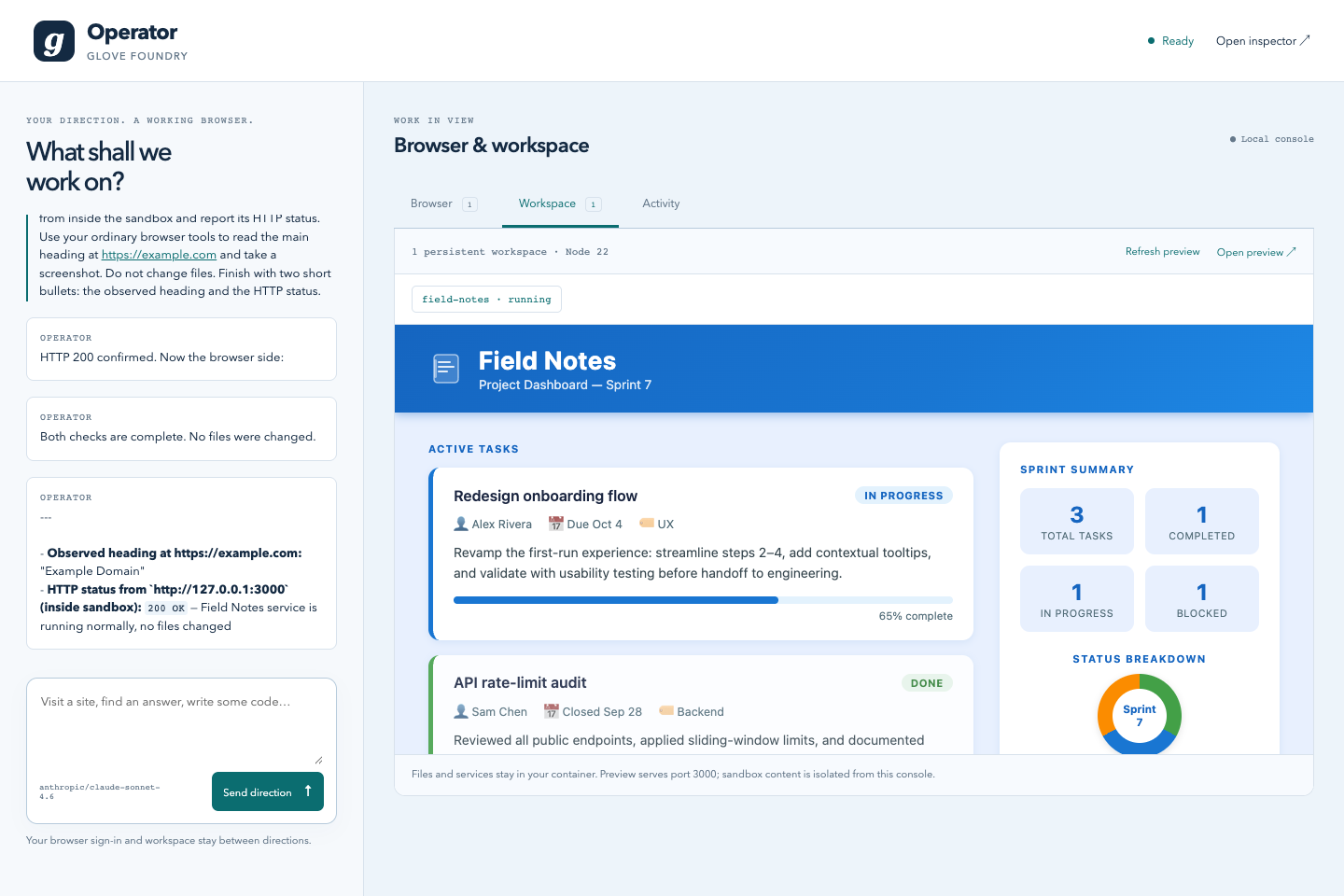
Station's container adapter supplies a non-root Node workspace with persistent files, bounded commands and managed services. The host supplies the image, resource limits and syscall policy. No host directory, provider key or Docker socket enters the container.
Use sandbox.writeText to write source code directly. Use sandbox.exec for commands and poll sandbox.command until completion. Use sandbox.startService for a long-lived server. The console previews container port 3000 through a separate-origin, sandboxed HTTP GET bridge. It supports small assets, not WebSocket/HMR or form POSTs. The remote Steel browser cannot directly reach that local preview.
What survives the next direction?
Operator mounts a native Foundry memory profile backed by private SQLite storage. Pinned task checkpoints and preferences are refreshed before each model step. Episodic memory records requests and decisions, entity memory keeps reusable known items, and resource memory holds notes and archived summaries. Each conversation has its own namespace.
The host preserves the exact current request outside compaction. The separate compaction prompt retains original outcomes, unfinished work, user constraints, evidence, uncertainty and the next action. Full transcripts, native task lists and inbox items survive restarts. Compaction pressure tracks the current context rather than accumulated billing across model calls.
| Resource | Lifetime |
|---|---|
| Conversation and instance | Private local files across restarts |
| Task checkpoints, preferences and recall | Native SQLite memory across restarts, isolated per conversation |
| Browser sign-in | Steel profile across released sessions |
| Live pages | Until explicit close, idle or provider expiry |
| Sandbox files | Docker volume until explicit deletion |
| Server process | Managed service across agent turns; stops with the host |
| Script variables | Current agent run only |
Operator uses retained browser and sandbox scopes. Closing a mount ends that run's access; the host retains resources and grants their IDs to the next run. Foundry's managed daemon remains local and stops with Foundry. The example is not distributed failover or a multi-tenant hosting service.
A live verification you can repeat
pnpm --filter glove-foundry-operator typecheck
pnpm --filter glove-foundry-operator test
pnpm --filter glove-foundry-operator verify
pnpm --filter glove-foundry-operator verify:memory
The live check uses your provider credits. It asks the agent to inspect Example Domain, build a demo app, start a managed service, and verify its response. The test independently fetches the preview and checks that both mounted tools were used. See the example README for resource cleanup, persistence limits and troubleshooting.
Verification uses a separate conversation and memory namespace. The memory check saves fictional task details, forces real-model compaction, and checks that a fresh activation recalls the unfinished task and restrictions. It does not change the user's pinned memory.